A business phone system that keeps the office calling.
CONNECT / Engage PBXEngage PBX is Engage’s business phone system: extensions, desk phones and softphones, auto attendants, ring groups and queues, voicemail, recording, and conferences, with an office PBX that keeps calls inside the office working when the internet is down.Product overviewAll products
How it connects
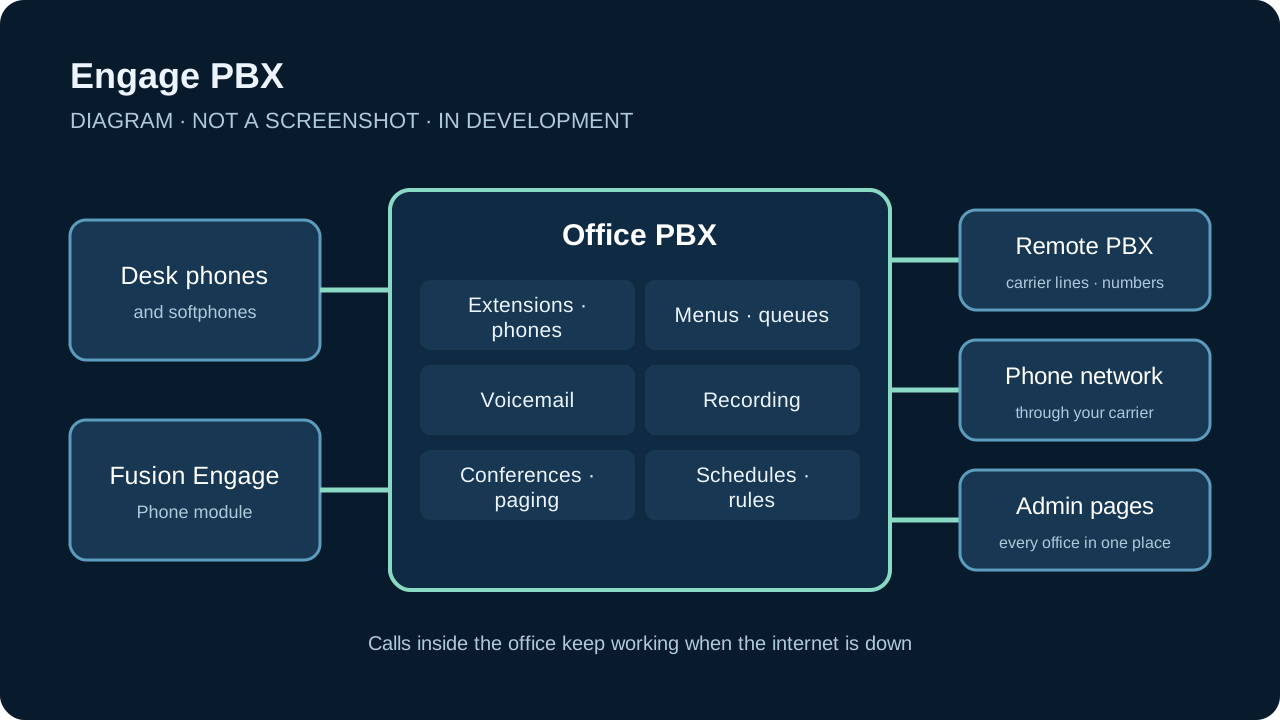
Portfolio advantageEngage PBX is the phone system behind Fusion Engage’s Phone module. Each office runs its own PBX, which holds what its people need to keep calling, and a remote PBX holds the carrier lines and phone numbers. Engage Server is planned to bring calls into the same connection as Engage’s mail and chat.
What Engage PBX brings together.
WHAT IT ENABLESA phone system for offices, with the features an office needs held by the office itself. Engage PBX is in development. Its current version, an office PBX and a remote PBX built in C# for Windows, is moving to Fusion’s own C++ call path, which so far is tested on a single machine and carries no live calls. The image is a diagram, not a screenshot.
Calling through an outage
01 · IN DEVELOPMENTCalls inside the office keep working when the internet is down. The office PBX holds the settings and call features its people need, rather than depending on a server elsewhere.
Carrier lines and numbers
02 · IN DEVELOPMENTA remote PBX holds the carrier lines, the phone numbers, and what happens to calls from outside, and reaches each office over the connection the office keeps open to it.
Extensions and phones
03 · IN DEVELOPMENTDesk phones and softphones on extensions, with busy lamps, do not disturb, forwarding, call pickup, hold, park, and blind and attended transfer.
Menus, ring groups, and queues
04 · IN DEVELOPMENTAuto attendant menus, ring groups that step through their members, and queues with a waiting list, agent log-in and pause, overflow, and wrap-up time.
Voicemail and recording
05 · IN DEVELOPMENTVoicemail when no one answers, with message lamps and messages sent by email, and call recording set by extension, with a retention period.
Conferences and paging
06 · IN DEVELOPMENTConference rooms with PINs, paging groups, and intercom calls that the receiving phone answers on its own.
Schedules and call rules
07 · IN DEVELOPMENTOffice hours, holidays, and named schedules decide what happens to each call, and a block list turns away unwanted callers.
Calls you can program
08 · IN DEVELOPMENTCall handling written in Solerra over a small set of building blocks: play, collect, ring, bridge, record, transfer, speak, and listen. Today a script can redirect or reject a call and play audio.
Every office in one place
09 · IN DEVELOPMENTSolerra admin pages list every office and edit its extensions, phones, schedules, and queues through the remote PBX. Administering an office on its own network with the internet down is still to come.