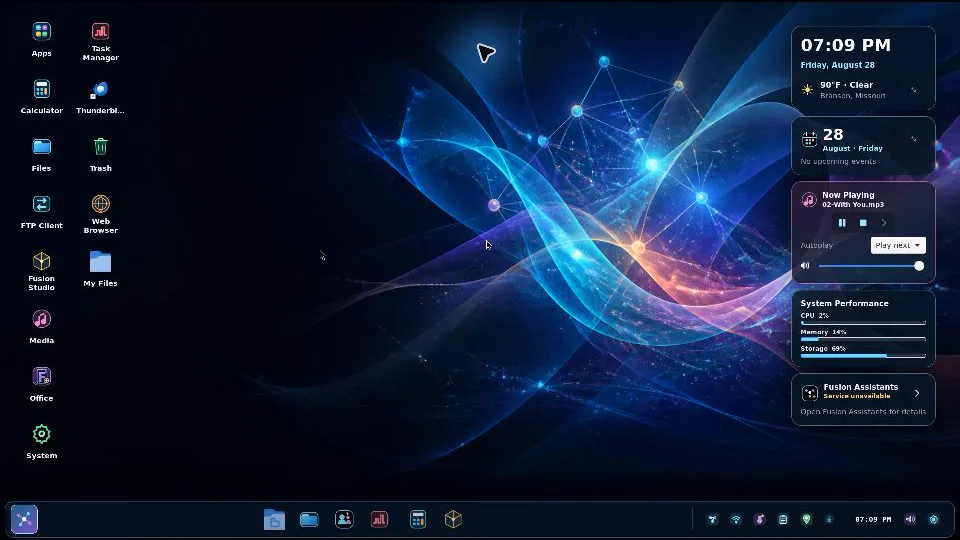
See Fusion OS running.
3D SCREENSAVER DEMO
A recording of Fusion OS: the desktop over its live 3D scene, then the 3D screensaver, in which the desktop’s icons and widgets lift off and circle the Fusion mark while the view flies through the scene. Drawn by Fusion 3D Engine.
Fusion OS 3D screensaver demo
What Fusion OS brings together.
WHAT IT ENABLES
Advanced storage, faster file workflows, SIP, speech, programmable nodes, and outcome automation become shared operating capabilities.
Fusion Virtual Machine (FVM)
01Similar in role to the Java Virtual Machine (JVM), the Fusion Virtual Machine gives Solerra applications a common execution foundation. Developers can reuse application logic across supported operating systems, bringing familiar experiences to more users with less platform-specific rewriting.
Fusion Runtime Environment (FRE)
02Similar in role to the Java Runtime Environment (JRE), the Fusion Runtime Environment brings application execution, shared libraries, and native engines together. Graphics, media, storage, and networking become common building blocks, so developers can focus on what makes their applications valuable.
Your applications. More places.
03A portable foundation connects the Fusion experience across Fusion OS, Windows, Linux, and macOS. Use familiar applications and workflows across devices, while Fusion OS brings them together in a Linux-based desktop with deeper access to shared system capabilities.
The Fusion 3D engine, integrated
04Explore models, maps, interactive diagrams, and simulations directly in your applications. A shared 3D engine brings visual experiences into everyday work, with the editor and large content libraries available for projects that need them.
A native 3D windowing API
05Work with interactive 3D inside familiar application windows, alongside ordinary controls and navigation. Optional spatial workspaces bring a new dimension to organizing information, presenting ideas, and exploring complex projects.
One engine across the Fusion experience
06Shared rendering, materials, and asset foundations connect Fusion applications across platforms. Developers can carry improvements between products and spend more time building experiences instead of maintaining separate engines.
A responsive desktop by design
07Coordinated graphics and application services help direct resources toward the work you can see and use. The platform design prioritizes responsive interaction, efficient resource use, and a desktop that stays usable during demanding tasks.
See where your storage goes
08Understand file sizes, stored space, compression savings, and shared data in the file browser. Intelligent storage combines compression and deduplication with a clearer view of how your files use capacity.
Folder totals at a glance
09See folder sizes, file counts, and selection totals as part of the everyday file experience. Maintained storage information is designed to reduce repeated counting and help you make faster decisions about organizing, moving, and protecting data.
Fast copying, built into everyday work
10Copy and move files through familiar commands and drag-and-drop. A shared parallel copy engine combines progress, cancellation, conflict handling, and integrity checks in one consistent experience.
Connected files without the friction
11Reach trusted Fusion OS devices through named network locations. Shared-content detection, interrupted-transfer recovery, and connections to existing network shares help keep files moving between people and machines.
Stream files, media, and 3D
12Open remote content, seek through media, and explore detailed 3D scenes without waiting for every asset to arrive. Delivery adapts to the experience, from interactive playback to dependable file access.
Protection and media, part of your desktop
13Connect scheduled backup and recovery with everyday file workflows. Bring media libraries, conversion, disc collection management, and device synchronization into the same operating environment through Vault Backup and Fusion Media Manager.
Speak, listen, and stay connected
14Bring calling, read-aloud, dictation, and transcription into applications and daily workflows. Shared communication and speech services help turn conversations and ideas into useful work.
Automation that follows through
15Connect applications, files, and devices around the outcome you want. Background work stays visible through progress, retries, cancellation, and completion, helping repetitive tasks become dependable workflows.
A connected application ecosystem
16Bring Fusion applications together with Linux software, Windows and Android compatibility environments, and web experiences. A shared launcher and consistent controls help people work across application types from one desktop.