ENGINEERING / Fusion MATFusion MAT is Fusion’s computational engineering environment: mathematics, algorithms, visualization, and automation written in Solerra, connected to Fusion CAD and Fusion SIM, with an AI assistant that understands the code, the model, and the results.Product overviewVisit fusionmat.cloud ↗
How it connects
Portfolio advantageFusion MAT is the computational layer between Fusion CAD and Fusion SIM: CAD creates, MAT computes, SIM simulates. Shared geometry, 3D viewing, storage, and automation capabilities let one program carry a design from model to study and back.
What Fusion MAT brings together.
WHAT IT ENABLESCode, data, plots, models, and simulations stay in one workspace, so engineers can write, run, inspect, and run again without leaving Fusion.
Write, run, inspect
01Write scripts and functions in Solerra, or type a line in the console and see its value at once, with the whole workspace still in memory.
Mathematics in the language
02Vectors, matrices, and tensors with element-wise arithmetic, statistics, indexing, and the matrix product, built into Solerra for engineering work.
Engineering computation
03Linear algebra, root finding, differential equations, optimization, curve fitting, and regression for engineering problems.
Visualization
042D plots, 3D surfaces, contours, meshes, and fields appear the moment you ask for them, next to the code that made them.
Fusion CAD from code
05Read and change parameters, dimensions, and mass properties, generate geometry, and save design variants as configurations of the part.
Fusion SIM from code
06Set up and launch studies, run them in batches, and bring their results back to analyze, plot, and compare.
The automated loop
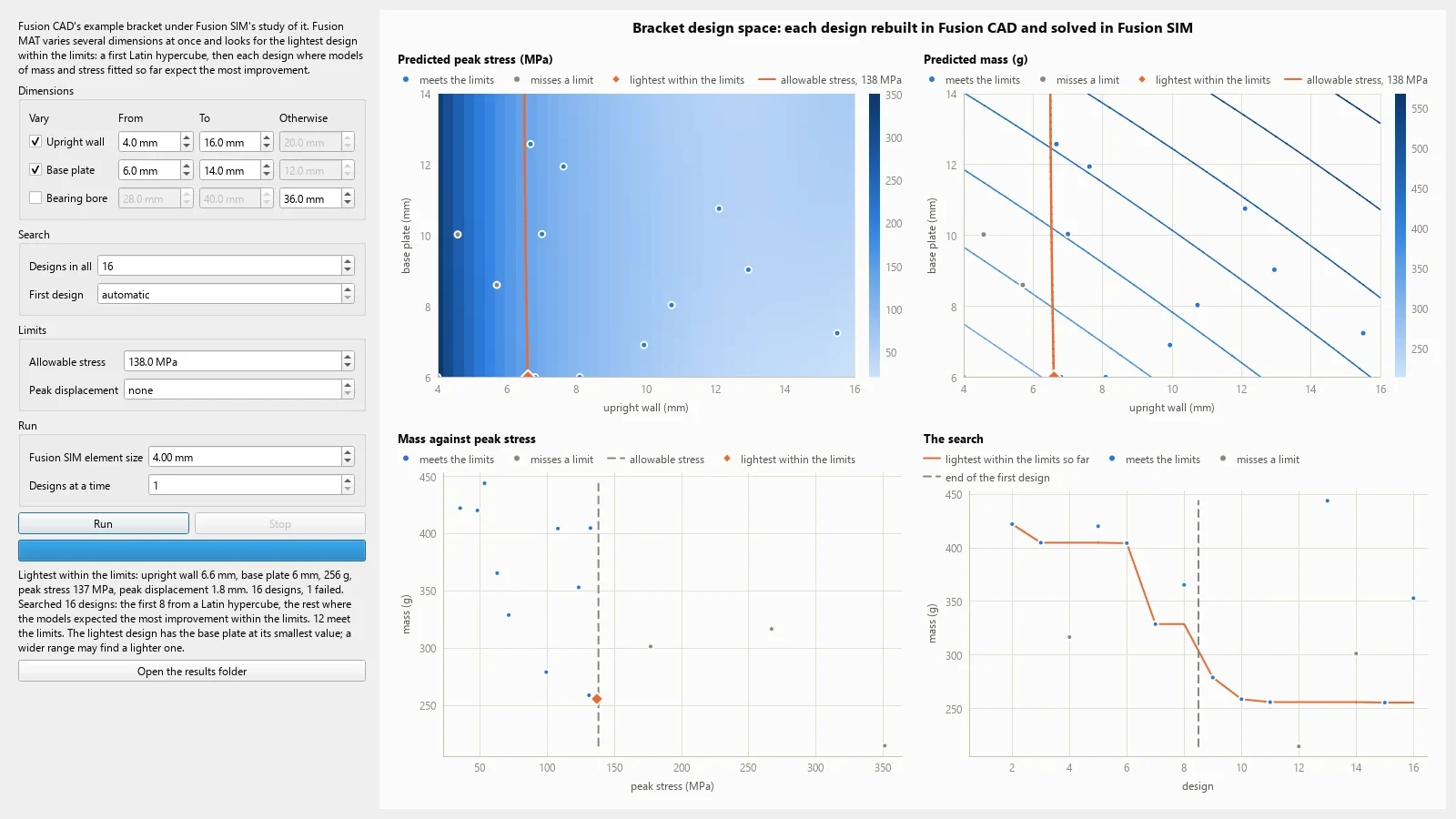
07Parameter sweeps and optimizations that run CAD → MAT → SIM → MAT, then hand the chosen design back to Fusion CAD.
An assistant that knows the model
08Generates, explains, and debugs code, builds workflows from a single request, and shows its changes to scripts and models for review before anything is written.
Results in 3D
09Draw Fusion CAD geometry and Fusion SIM results, such as stress on a part, through Fusion 3D Engine.
One product experience. A platform underneath.
THE SHARED FOUNDATION
Fusion MAT
FOCUSED PRODUCT EXPERIENCE
Shared capabilities
COMPUTATION · GEOMETRY · SIMULATION · 3D VIEWING · AUTOMATION · AI
Fusion runtime
Solerra · FSML · FSS · CAPABILITY ABI · PROVIDERS
Infrastructure
WINDOWS · FUSION OS · LOCAL · CONNECTED SERVICES
Designed to work with the rest of Fusion.
CONNECTED PRODUCTS
Fusion CAD
ENGINEERINGDesign mechanical parts and assemblies with sketches, parametric features, editable history, and joints.Explore Fusion CAD
Fusion SIM
ENGINEERINGStudy how designs behave with a Systems base edition and modules for electronics, structural, thermal, motion, fluids, and more.Explore Fusion SIM
Fusion 3D Engine
CREATEInteractive worlds, models, and simulations rendered by Fusion’s core 3D engine.Explore Fusion 3D Engine
Explore Fusion MAT.
See the product in action, then continue through the broader Fusion portfolio.Visit fusionmat.cloud ↗Fusion Software LLC · 2026Fusion MAT