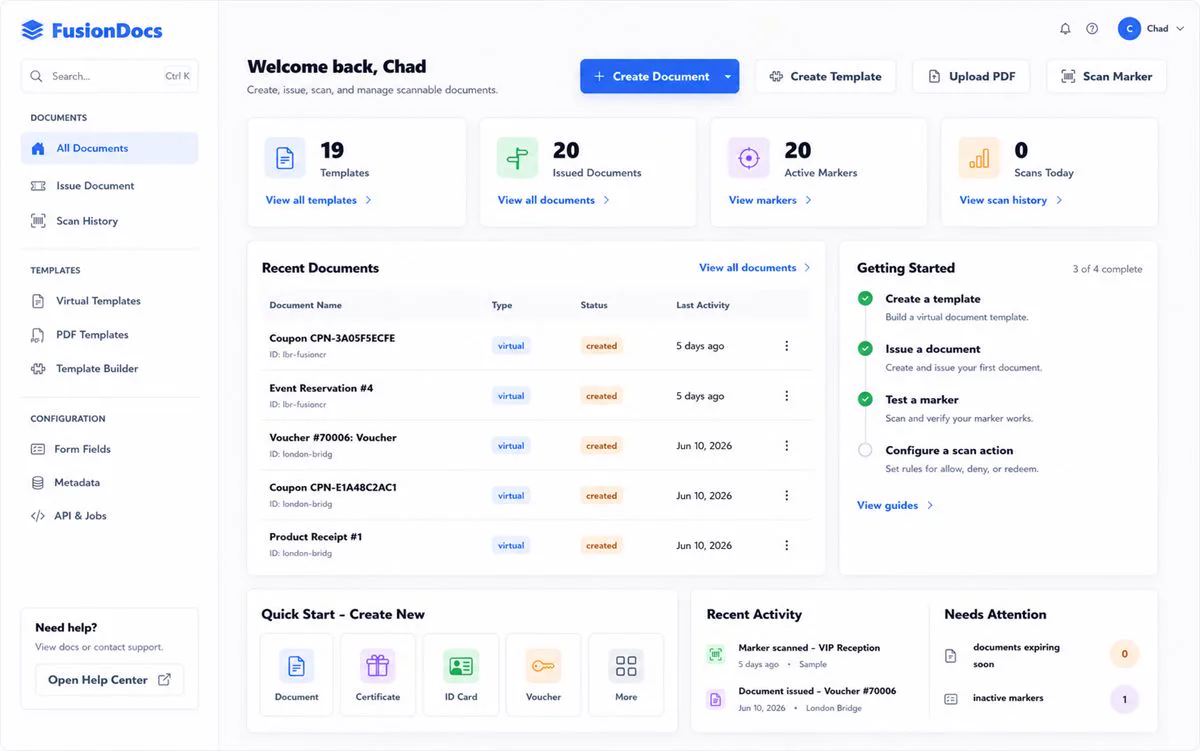
OPERATE / Command DPSCommand DPS (Document Processing Server) creates, displays, routes, signs, verifies, and connects documents to the work and decisions around them.Product overviewVisit fusiondocs.cloud ↗All products
How it connects
Portfolio advantageShared identity, documents, communications, workflows, automation, and evidence connect Command DPS with Command CRM, Engage, and Vault Backup without forcing them into one oversized application.
What Command DPS brings together.
WHAT IT ENABLESDocuments retain their business context through structured creation, review, signature, verification, routing, and retention.
Documents with context
01Keep files connected to customers, workflows, approvals, and outcomes.
Structured creation
02Combine templates, data, layout, and reusable components for repeatable documents.
Review and signature
03Support controlled routing, review, acknowledgement, signature, and evidence.
Portable rendering
04Use shared document and PDF capabilities across web, desktop, and connected environments.
Connected workflow migration
05Bring established document workflows into Fusion contracts in controlled, evidence-led stages.
Trust built in
06Connect identity, authorization, integrity, audit, and retention to the document lifecycle.
LOCAL · CLOUD · WINDOWS · LINUX · CONNECTED SERVICES
Designed to work with the rest of Fusion.
CONNECTED PRODUCTS
Command CRM
OPERATECustomers, accountable work, workflows, evidence, and required outcomes remain visible within one operational model.Explore Command CRM
Engage
CONNECTEngage PBX, Mail Server, Webmail, messaging, reception, delivery evidence, and follow-up connect communications directly with customers and work.Explore Engage
Vault Backup
PROTECTContent-aware protection, exact verification, efficient history, and documented recovery operate as one dependable system.Explore Vault Backup
Explore Command DPS.
See the product in action, then continue through the broader Fusion portfolio.Visit fusiondocs.cloud ↗Fusion Software LLC · 2026Command DPS